


Published: 05/29/2020
Copart recently unveiled the newest version of its Lot Details page this week, giving you an enhanced layout with easier access to must-know information about your favorite cars, trucks and SUVs. Whether you’re on a desktop or using your smartphone to do your bidding and buying, this new Lot Details page gives you the information you need, faster and more effectively.
Some highlights of our new Lot Details page include:
Bidding Eligibility Details
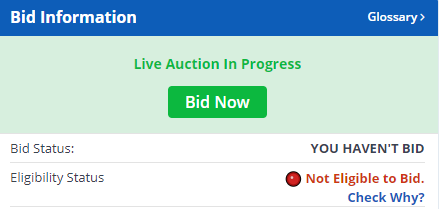
Now you can check on your bidding eligibility before you enter the auction. You can check your Eligibility Status, which will let you know whether you are able to bid on that particular vehicle, in the Bid Information located in the upper right-hand corner of the page on the desktop version. If you’re not eligible to bid, click on “Check Why?” for more details and next steps.
Easier Access to Information
With an updated page layout, you can find your vehicle’s information easier and faster than ever before. Details like sale location, sale date and time, etc. are now conveniently located at the top of the Lot Details page, preventing you from having to scroll in order to view these important notes.

We’ve also added a Shipping widget at the top of the page to quickly skip you to our Shipping Estimate section. This section calculates additional delivery transportation fees based on your zip code.

New Options
Under the Lot number, you can view everything from your vehicle’s mileage to its damage; however, if you’re interested in learning more, click on the newly added More Information tab. This new addition highlights the most important vehicle details and allows you to navigate to the Vehicle Condition Report, license requirements and Brokers pages based on its location.

Larger Images
On desktop, you can inspect the ins and outs of your favorite vehicles from the comfort of your home or office. Our larger images of the vehicles allow you to closely examine as if you’re viewing in person. By hovering over the image, you can magnify certain areas of the vehicle you want to view in greater detail as well.
Browse through Copart inventory here to find your favorite vehicles and check out the new look of the Lot Details page.
